Thursday, November 02, 2006

GeoTagging in NYTimes

Pictures, With Map and Pushpin Included
By IAN AUSTEN
Published: November 2, 2006


KATHLEEN BENNETT recently bought a device that keeps track of her location with help from the satellites of the Global Positioning System. But unlike many other people in Seattle, Ms. Bennett is not, by her own description, “an outdoor person” and will not be using it to find her way through the wilderness.

Kathleen Bennett uses a Global Positioning System unit when she takes her pictures. That data, and her pictures, are displayed on maps on her page on Flickr.

Instead, the new gadget is an accessory for Ms. Bennett’s personal passion, photography. She is one of many people who have taken up geotagging, which, broadly speaking, is the practice of posting photos online that are linked to Web-based maps, showing just where in the world the shutter was pressed. The rest of the article here.

Saturday, October 14, 2006

Panoramio Experience (update)

In my last post I lamented that Panoramio and GeoTagger did not *seem* to play together. I was very wrong. GeoTagger does indeed add GPS coordinates to the EXIF jpegs, and Panoramio does indeed read that EXIF info and map the jpegs appropriately. It all works like butter.

Here's where "user error" (my bad) came into play: when I uploaded the GeoTagged images via Panoramio's browser-based uploader, I was impatient. And because I saw the "Map this Photo" button, I incorrectly assumed that it hadn't read the GPS coordinates. Had I clicked "Finish" it would have been automatically read and mapped.

My apologies to both Panoramio and GeoTagger, both of whom have contacted me to help me figure it out (which is very cool, thanks guys!).

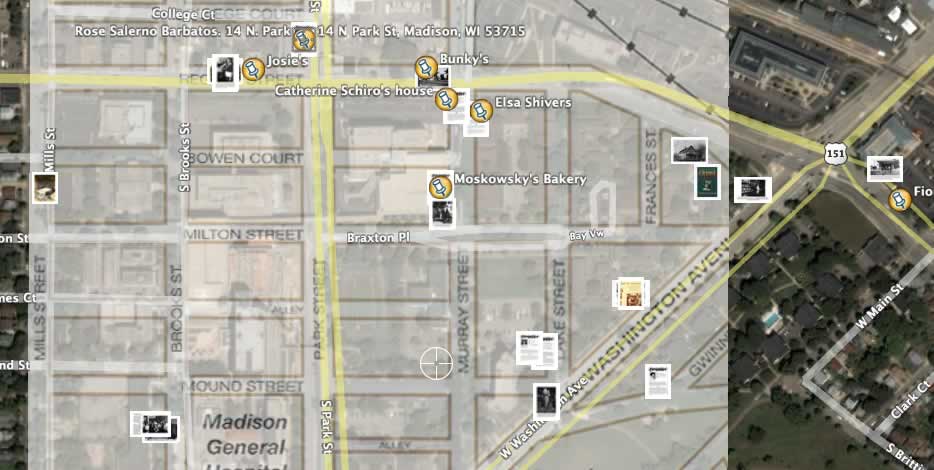
What I'm doing, as part of a Local Games Lab project, is assembling a place-based GeoCultural tour of a Madison, Wisconsin neighborhood that had been decimated by "Urban Renewal" project in the 1960s. This will eventually (this upcoming week) be ported to GPS-enabled Pocket PCs as a walking tour, and ultimately evolve into a game playable by three roles: Urban Planner, Ethnographer, and Historian. For now, I've overlayed a historical map in Google Earth that shows streets and features that have been bulldozed, and I use it to locate images based on other information we have. On Google Earth, it looks like this right now:I figure that it would be a good thing to have an option to do a web version of the tour even if you didn't have access to the handheld computers, or weren't in Madison, so combination of Panoramio and GeoTagger seem to be the best and easiest ways to do that. And I'm even more excited that they're cool, dedicated people.

Thursday, October 12, 2006

Tripper vs. Panoramio

Trippermap might be cool. Let's see...


Okay, Tripper Map has potential, but the free version is not detailed enough for us; we'd need the "$10/year" version that incorporates the Google Map API. So, the question is, do we go with this for $10, or go with Panoramio.com for free?

Panoramio Pros
  • free
  • used it before
  • they seem nice
  • website badge uses Google Maps and looks great
  • incorporates photo thumbnails into Google Earth (looks great!)
  • email/post kml files (Google Earth) for others
Panoramio Cons
  • slow, but improving
  • single uploads only (no batch uploads)[UPDATE: Upon further use, I've found that their browser uploader is actually very fast as it allows multiple concurrent uploads, just not "batch" uploads. It also lets you edit the image titles as you wait.]
  • slow, manual geotagging process. Can't just type in an address, have to type in a city, then choose what state or country that city was in, etc. [UPDATE: Two things I've found. First, you only need to go through this process once, then do multiple uploads for that general location. It won't make you go through the process again until you hit "Finished". Second, if the jpeg has GPS coordinates in the EXIF info, you don't need to mess with the manual mapping at all; it's automatically read and mapped.]
  • Get errors: "Unable to select database: Too many connections"
  • doesn't (seem to) read EXIF info that I put on the images with GeoTagger although that may be GeoTagger's fault because it doesn't seem to work with Tripper either)[UPDATE: this was a user error. See next post.]
Tripper Map Pros
  • uses Flickr (easy batch uploads, easy Geotagging bookmarklets, popular and widespread, familiar)
  • Google Map API is great (check it out here under the "Mark's Google Map" tab)
  • can be easily incorporated into any website or blog
Tripper Map Cons
  • free map interface is too basic
  • free map interface renders poorly not close enough
  • "Premium" Google Map interface is $9.95/year
Hmm. I'm torn. [UPDATE: Not so torn anymore. Panoramio and GeoTagger have the edge (imho).]

Wednesday, October 11, 2006

Geotagging in iPhoto

From OgleEarth, of course, comes a post of a brilliant person with ideas.

This one is much easier than the Flickr Geotagging process I mentioned on 8/22/06, and more fun because you get to mess around in Google Earth (which recently got updated to v4, by the way).

Here's how it works: Geotagger prepares images by adding GPS info (from GoogleEarth). Then you import the pics to iPhoto, and export them with the iPhotoToGoogleEarth plugin. I'll post more when I've done something with it.

There's also a newish thing called Trippermap that maps your Flickr photos. I'll have to check that out too.

Friday, September 15, 2006

Paper-based Local Games

Through a MacArthur grant by Squire, Steinkuehler, Hayes, and Shaffer, I've been hired to help out with the Greenbush AR Game, the Star Schools Games Project, and the design and creation of a GLS (Games Learning and Society) Area in the Teacher Education Building.

One of the requirements of the Star Schools grant, I understand, is to create a paper-based game as a "control" game. As I was considering how to make such a game, I was led to the following thoughts on games, in general.
  • Re-playability: None of our tech-based games are really re-playable. They aren't designed to be. The philosophy that I think is behind this -- subconsciously, or unconsciously -- is from a curriculum mindset. We design a curriculum for kids to "go through" once. Then, next year, a new set of kids go through it. To contrast, the best games are infinitely re-playable. Imagine playing tic-tac-toe only once. You barely get the rules of the game and it's over. There is no "discovery and mastery" of the rules in a game that is played only once, unless it is heavily based on a well-known genre of games -- in which case it is more of a single variation of that game than its own game. And this is fine, if we want to go for that, but then the content of this particulat game is backgrounded.
  • Element of chance: If the game is too specifically directed, it's less of a game and more of a tour or a puzzle (maybe not a puzzle). The connect-the-dots option of specifying a path to take cannot be the best option, but I'm not sure of other options that would assure that the content was covered as well -- especially given the time constraints of a place-based game. This is a tough issue.
The affordances of the card game that we're working on supports both re-playability, and chance. Card games are typically quick, portable, and place-indifferent. In these ways, they contrast greatly with the type of tech game we're trying to make, which is markedly slow (need to move through the world), and place-specific (which I guess is the opposite of portable -- can't move South Shore Beach easily).

With this in mind, I think we should consider forgetting to try to make the paper-based game content-specific, and instead make it concept-specific. After all, learning about E. coli on a particular beach is not the ultimate idea behind any of these games. Instead, what we're trying to teach is math and reading, and maybe a bit of scientific thinking, right?

We can do that with a variation of flash cards -- and teachers have been doing that. I think this might be a better paper-based option that gets closer to the heart of what we're actually proposing -- that place-based games are richer.

So, tell me where my thinking here is off-base. Am I missing something? Or are we trying to do something much more through the paper game than we need to / want to?

Tuesday, August 22, 2006

Geotagging Flickr pics

There's a not-too-complicated web app to manually generate geotags for your Flickr! photos at beeloop.com. Just
  1. drag and zoom the map center to the location that the pic was taken,
  2. copy and paste info generated in the first field into your Flickr! tags for the pic,
  3. copy and paste info generated in the second field into your Flickr! description of the pic
You end up with something like this:
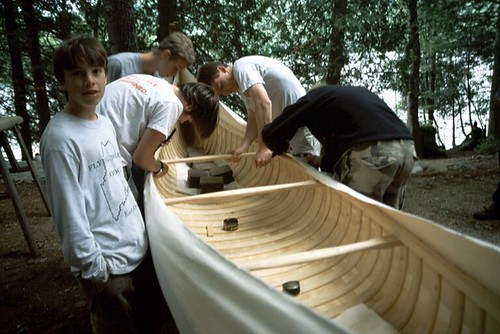
canvassing our newly made cedar canoe at Flying Moose Lodge, on the weekend, when the boys are back from their trips. Click here to see where this photo was taken. By courtesy of BeeLoop SL (the Mapware & Mobility Solutions Company).
On the cool scale, I'd say this isn't quite as nice as panoramio.com, but it *does* have the Flickr! connection that may be useful.

Ogle Earth

If you're interested in place-based stuff, and haven't already been accessing the Ogle Earth site, you should start now. Their list of links has a lot of cool things like Panoramio, and Mappr!, etc. And the blog itself highlights some of the sorts of things potentially of interest to place-based game developers -- for example, the Gombe Chimp Blog post points to a place-based blog done up by the Jane Goodall folks. Pretty cool. Imagine place-based game content on Google Earth, further blending the line between virtual and physical. Especially integrating photos (hey! that's my camera!)

PocketPC annoyance

It may be that I'm overlooking something obvious, but if my experience is typical, I'm at a loss to understand why anyone keeps using this platform. Here's my question: "If the battery is completely discharged, do I lose everything on it?"

It seems as though, on my 3 day drive back to Wisconsin, where my HP iPaq 4350 PPC was left in its case with an admittedly low battery, the battery died. This shouldn't matter, but when I restarted it, it ran through the initial set up (and stupid tutorial) sequence, and when it announced that it was ready to use, all my files and settings were gone.

Why does this matter? After all, my game files are safe because I have to load them from the Dell, and the things that I had sync should be safe, right? But the programs like chikyu, that lets me take waypoints and save them as Google Earth-friendly files, is gone. And all the Google Earth-friendly waypoint files I made in the Wildlands (in Maine) are gone. And the Task Manager program I loaded is gone. And EarthComber. And a bunch of other programs. Gone. Very annoying.

I suppose the thing to consider is that this sort of thing usually only happens once, and after that the user (me) learns to either never let the battery die, or to back up everything all the time. Maybe there's a program that will automatically back everything up to the storage card (I have a 1GB card I could use for that). But the bigger issue is that the waypoints are lost. They're still on the 'backup' GPS unit I bought when I was having troubles with the PPC and BT GPS combo -- as far as I know the Explorist 400 uses a memory that does not lose data when the battery is dead (at least it didn't when the battery last died).

Grrrrrr....

Thursday, June 15, 2006

GeoTagging and AR games

I meant to post this before I took off for Maine. Alas, plans...

It may be a helpful design step (as far as envisioning and sharing visions) to use Panoramio.com to geolocate pics and descriptions. I've started doing this with the Greenbush game stories here:

http://www.panoramio.com/map/?user=3582#lt=43.064310&ln=-89.400446&z=2&k=2&a=1

Note that it only supports JPEGs, so it may not be useful towards the end of the design phase. But it does support both JPEGs and "comments"--and allows multiple comments per pic, so design conversations can be held.

Anyway, I thought it was worth looking at.